Deskcenter · Software Catalogue

Software Catalogue incl. Advisory Integrated: know which software is really in use

The software catalogue turns the raw data of your Deskcenter inventory into a clean software portfolio: updated daily, with around 18,000 manufacturers and more than 1.7 million fingerprints. Advisory Integrated is included at no extra cost and analyses the data in 36 dashboards, including known vulnerabilities (CVEs).

The Software Catalogue incl. Advisory Integrated module combines two things: the recognition database Deskcenter uses to identify your installed software unambiguously, and the Advisory reporting built on top of it. It is the same database that powers mosaic Advisory Connect.

~18,000manufacturers
1.7 m+fingerprints
dailyeditorial updates
36dashboards included

What the software catalogue does

  • Updated every day: an editorial team adds new products, editions and versions to the catalogue daily, and the live update service delivers them. You do not need your own recognition rules or fingerprints.
  • Several recognition sources: file scan, registry and software ID tags (SWID), inventoried with or without an agent.
  • Normalisation: consistent manufacturer and product names, detection of suites and bundles, classification as commercial or freeware.
  • Categorisation: products grouped by area of use. You can see where several programs serve the same purpose and standardise your portfolio with the help of suggested alternatives.
  • Risk rating: suspicious software such as games, downloaders, adware or file-sharing tools is flagged and can be removed through software rules.
  • Lifecycle and patch level: release levels and end-of-life dates per product as well as the patch level of your installed versions, as a basis for software deployment and patch management.

Advisory Integrated included

Advisory Integrated is part of the module at no extra cost. It matches the recognised software products and versions against the National Vulnerability Database (NVD) and presents the results in 36 Power BI dashboards: known CVEs by severity, potentially affected devices and software products, lifecycle and data quality, including historical trends.

  • Identify: match known CVEs to inventoried products and versions, based on the NVD.
  • Assess: review CVSS base, exploitability and impact scores.
  • Prioritise: highlight devices and software requiring attention.
  • Report: use dashboards and historical trends to support documentation.
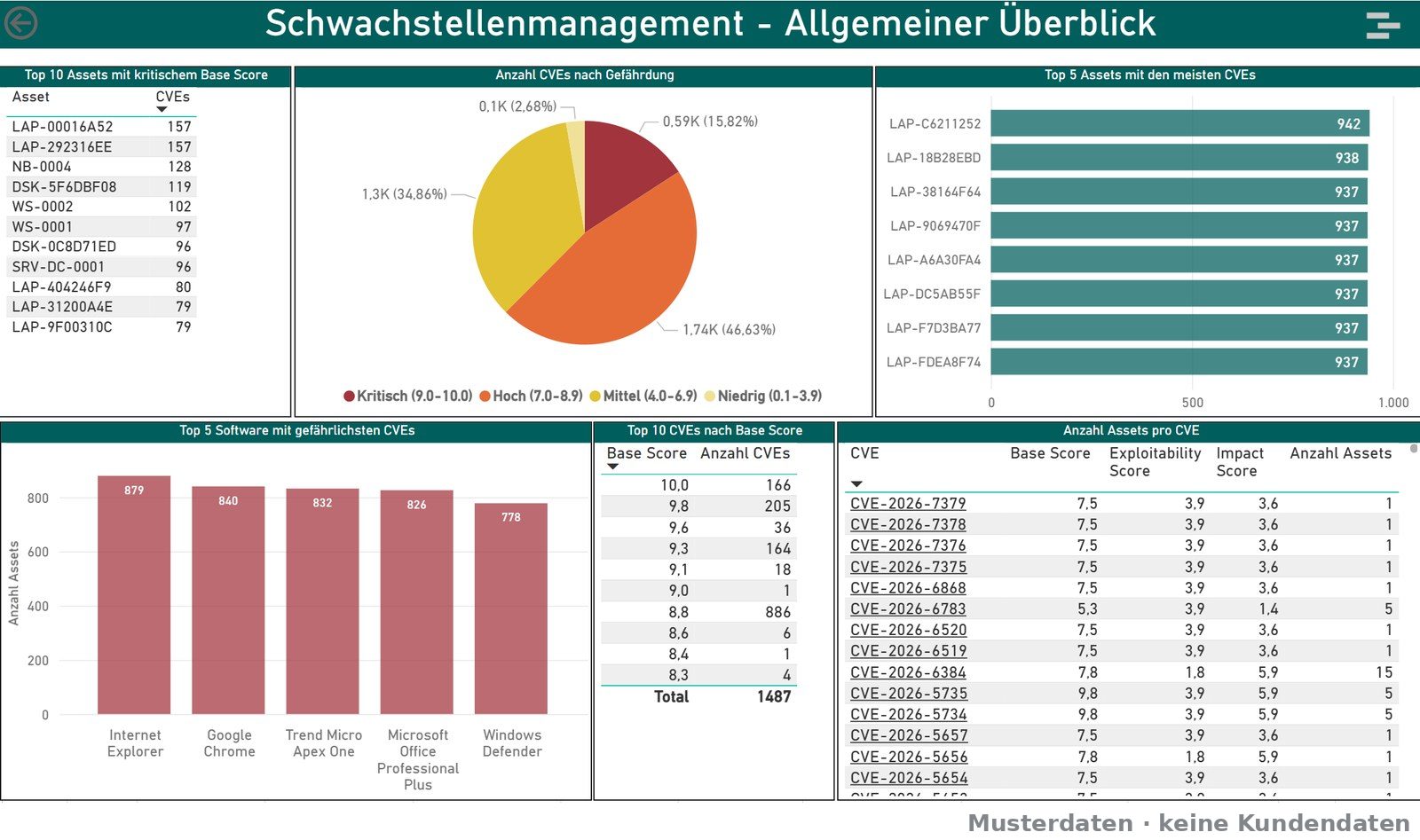
Power BI vulnerability management: CVE distribution by severity, affected devices and software, sample data
Available "Vulnerability management" report in Advisory Integrated. Sample data, no customer data, German interface.

One database, two routes

The software catalogue is the same database that mosaic Advisory Connect uses. In the Deskcenter Management Suite you get it as a module including Advisory Integrated, with the Deskcenter inventory as the data source. If you use an inventory system from another vendor, mosaic Advisory Connect enriches its data with the same catalogue.

Remediation through the Deskcenter Management Suite

The software catalogue and Advisory Integrated identify and assess. Remediation takes place separately through software deployment and patch management in the Deskcenter Management Suite, not through a patch button in Advisory. Which steps you can take there depends on the licensed modules of the suite.

Good to know

The software catalogue and Advisory Integrated are only available together, as a separately licensable module of the Deskcenter Management Suite. Advisory Integrated, including CVE reporting, is included at no extra cost.

Advisory is not an active network or application scanner; matching is based on inventory data. The reports can support risk management and documentation in connection with NIS2, KRITIS, DORA and ISO/IEC 27001, but do not replace an ISMS or other required security measures.

Vulnerability management8 dashboards

Known CVEs from the National Vulnerability Database (NVD), matched to your software versions.

Overviews5

  • General overview
  • General product overview
  • Detailed product overview
  • Hardware overview
  • Threat overview

Detail views (drillthrough)3

  • Details by asset
  • Details by software
  • Details by CVE

Advisory: software, hardware and vendors28 dashboards

Software transparency, lifecycle and data quality from your inventory data.

Software inventory7

  • General overview
  • Installation overview
  • Quantity overview
  • Applications by function
  • Product analysis
  • Operating system overview
  • EXE file locations

Security and lifecycle5

  • Applications with security risks
  • Unwanted applications
  • Security solutions
  • Patch analysis
  • Product support overview

Vendors4

  • Vendor overview
  • Vendors by country
  • Vendors by domain
  • Vendors and software products in domains

Java4

  • Java installation overview
  • Java overview by device
  • Oracle Java overview
  • Java total overview

Microsoft4

  • Microsoft-specific software products
  • Microsoft-specific SQL Server
  • Microsoft-specific servers (hardware)
  • Microsoft-specific systems (hardware)

Hardware and data quality4

  • Hardware: general overview
  • Hardware: details
  • Hardware: extended details
  • Scan quality and data currency

All 36 dashboards are available in mosaic Advisory Connect and in the Software Catalogue incl. Advisory Integrated module. The report interface is in German. We are happy to show you sample data or a live demo with your data in a meeting.

Not keen on running it yourself?

With Managed Deskcenter we run the suite for you – updates, configuration and reports included. Software and operations from a single provider.

View Managed Deskcenter →

See the suite live – in your environment

Free demo or 30-day trial: we will show you what Deskcenter can do with your data. No sales theatre.

Become a Deskcenter partner

Are you a system house or managed service provider? Offer the Deskcenter Management Suite to your customers as a certified partner – with training and technical support directly from the manufacturer.

Become a partner →